Monday, December 28, 2009

How to restote a crashed session in Firefox?


Ever heard of about:sessionrestore

It lists all the tabs and windows of the last session in case the last session was crashed.

So you can use it if you do not get an option to restore your previous session after a crash.

In Firefox, typing "about:sessionrestore" in the address bar gives the following screen:


Works in Firefox 3.5.6
Note: It may work in other versions as well though I have only tested it in 3.5.6

Tuesday, November 10, 2009

Follow your Twitter account using Google Chrome

Chromed Bird is an open source Chromium extension that allows you to follow your Twitter
account from within your Google Chrome browser.


This extension integrates well with your twitter account and allows you to

  • Follow your friends timeline and navigate through older tweets;
  • Tweets caching to avoid hitting Twitter's API rate limit;
  • Compose, reply, and RT tweets;
  • The extension updates itself as soon as new versions are available.
  • Track read / unread tweets;
  • Notify user whenever new tweets arrive.


Download Chromed Bird


Wednesday, October 21, 2009

How to restrict "Windows Search" from searching inside zip files (Tips)


The Search for files and folders of WindowsXP and Windows Vista has an annoying feature of also searching inside all the zip files contained within the drive or folder you are searching in.


This can be useful for folders that does not contain large zip files. But if your drive/folder has too many zip files and/or there are some large compressed files then Windows will uncompress and search inside each zip and you will find search to be a never ending process.

Unless you are doing a deep rigorous search this is an unnecessary feature.

How to disable/restrict windows from searching inside zip files

Windows Vista
Turn it off:

1. Open the Registry Editor (regedit.exe).
2. Navigate to HKEY_CLASSES_ROOT\CLSID
3. Delete this key: HKEY_CLASSES_ROOT\CLSID\{E88DCCE0-B7B3-11d1-A9F0-00AA0060FA31}
4. Delete this key: HKEY_CLASSES_ROOT\CLSID\{0CD7A5C0-9F37-11CE-AE65-08002B2E1262}
5. Restart Windows (the change won't take effect until you do).

Windows XP

Turn it off:

1. Select Run from the Start Menu.
2. Type regsvr32 /u %windir%\system32\zipfldr.dll at the prompt, and click Ok.
3. The change will take effect immediately, but you may have to restart Windows for all traces of the built-in ZIP support to disappear.

If, at any time, you wish to re-enable Windows XP's built-in ZIP support, just follow these steps:

1. Select Run from the Start Menu.
2. Type regsvr32 %windir%\system32\zipfldr.dll at the prompt, and click Ok.
3. The change will take effect immediately, but you may have to restart Windows for all features of the built-in ZIP support to be available.

Via [Annoyances.org]


Pingbox - Add a chat box to your Blog


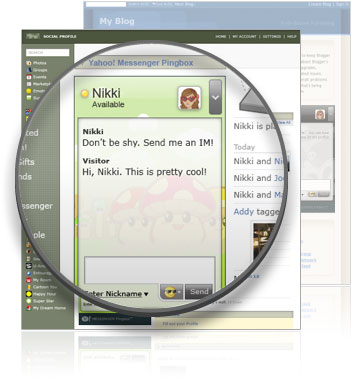
Yahoo! Messenger Pingbox™ is a service that allows you to instant chat with anyone (privately) who visits your website or blog. Setting up this gadget or widget is very simple.


After you create the widget and add the Pingbox to your social network profile, blog, or website, you can chat with your visitors when you are signed into Yahoo! Messenger!

Here is how to quicky add a pingbox to your blog.

(Adding to a website or Social network profile is very similar)

Step1: Style your Pingbox (Choose backgrounds, size, color, personal greeting, and more.)


Step2: Choose a website to add MyPingbox

-Any website
-MySpace
-Friendster
-hi5
-
Blogger (In our case)
-Live Spaces
-LiveJournal
-Xanga

Step3: Choose the dimensions.


Step4: Embed the widget code to your site.

Instructions for Blogger

1. Copy the code to clipboard.
2. Sign into Blogger.
3. Click the "Layout" link in the Dashboard box.
4. Click on "Add a Gadget" in the blog layout area.
5. In the pop-up window click on "ADD TO BLOG" under HTML/JavaScript.
6. Type in desired "Title" such as "Chat with Me!" or "My Pingbox".
7. Paste the Pingbox code into the "Content" area (Ctrl+V).
8. Click "SAVE CHANGES" to close the pop-up window.
Step 5: Chat with your visitors
Send and receive IMs with your visitors when you sign into Yahoo! Messenger. IMs between you and each Pingbox visitor are private.


Create you Own - Pinbox

Monday, October 19, 2009

Sublime text - A feature packed text editor


Are you looking for a good text editor, which allows to code and only code without any distractions then Sublime text editor can be a good option.
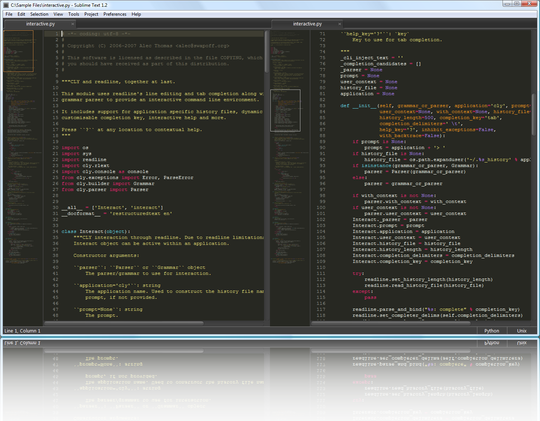

Its very user friendly and has support for a range of programming languages syntax highlighting (including C, C++, C#, CSS, HTML, Groovy, Java, JavaScript, XML and may others.), auto-save, find and replace using regular expressions etc.


It gives a nice clear interface and can use every pixel of your screen (full screen) so that you can concentrate on coding and nothing else. Apart from these features this editor is fully customizable and many different types of automation (macros, auto-complete, repeat etc.) are supported.


It allows for integration WinSCP for editing remote FTP files.


see a full feature list click here.


Sublime text is free to download for trial use (No limits - Just like EditPlus)
License for a single user on infinite machines, with free upgrades - $59.


Download Sublime Text.