
Yahoo! Messenger Pingbox™ is a service that allows you to instant chat with anyone (privately) who visits your website or blog. Setting up this gadget or widget is very simple.
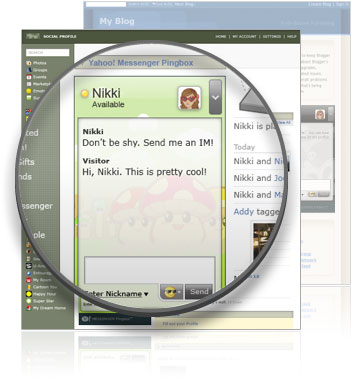
After you create the widget and add the Pingbox to your social network profile, blog, or website, you can chat with your visitors when you are signed into Yahoo! Messenger!
Here is how to quicky add a pingbox to your blog.
(Adding to a website or Social network profile is very similar)
Step1: Style your Pingbox (Choose backgrounds, size, color, personal greeting, and more.)

Step2: Choose a website to add MyPingbox
-Any website
-MySpace
-Friendster
-hi5
-Blogger (In our case)
-Live Spaces
-LiveJournal
-Xanga
Step3: Choose the dimensions.

Step4: Embed the widget code to your site.
Instructions for Blogger
1. Copy the code to clipboard.
2. Sign into Blogger.
3. Click the "Layout" link in the Dashboard box.
4. Click on "Add a Gadget" in the blog layout area.
5. In the pop-up window click on "ADD TO BLOG" under HTML/JavaScript.
6. Type in desired "Title" such as "Chat with Me!" or "My Pingbox".
7. Paste the Pingbox code into the "Content" area (Ctrl+V).
8. Click "SAVE CHANGES" to close the pop-up window.
Step 5: Chat with your visitors
Send and receive IMs with your visitors when you sign into Yahoo! Messenger. IMs between you and each Pingbox visitor are private.
Create you Own - Pinbox


No comments:
Post a Comment